
Office administrators are the heartbeat of every workplace. You manage diaries, support executives, coordinate meetings, handle finance tasks, respond to customers, and keep operations running smoothly. When everything works, it’s because you’ve quietly made it happen.
But here’s the challenge: how do you capture all of that value clearly on a resume?
The Office Administrator Resume Template from ATS Resume is designed specifically to help you demonstrate structure, service excellence, and operational impact — in a format that is professional, polished, and ATS-friendly.
For just $2, you receive an instant downloadable DOCX file that helps employers see, within seconds, why you’re the dependable, organised professional they need.
Why Office Administrator Resumes Often Get Overlooked
Administrative professionals do an enormous amount of invisible work. The problem? Many resumes simply list tasks instead of showing impact.
For example:
- “Managed calendars.”
- “Answered phones.”
- “Processed invoices.”
While these are important responsibilities, they don’t communicate value. Employers want to know:
- Did you improve efficiency?
- Did you reduce errors?
- Did you enhance customer satisfaction?
- Did you support leadership effectively?
- Did you help the business save time or money?
The Office Administrator Resume Template is built to guide you toward achievement-focused bullet points that demonstrate measurable contribution.
What Makes This Office Administrator Resume Template Different?
1. Operations Snapshot Section
Rather than vaguely describing your workplace, the template encourages you to outline:
- Office size
- Industry served
- Number of staff supported
- Reporting lines
This immediately gives hiring managers context about your level of responsibility.
2. Systems & Software Proficiency Highlight
Modern administration is powered by systems. This template provides a clean, easy-to-scan section to showcase proficiency in:
- CRMs and ERPs
- MYOB or Xero
- Microsoft 365
- Google Workspace
- Booking systems
- Document management tools
Recruiters often scan for keywords. This structure ensures they find them quickly.
3. Process Improvement & Cost-Saving Focus
Strong office administrators improve systems, not just maintain them. The template includes space to highlight:
- Automation initiatives
- Digital filing systems
- Cost reductions
- Time-saving workflows
- Inventory improvements
For example:
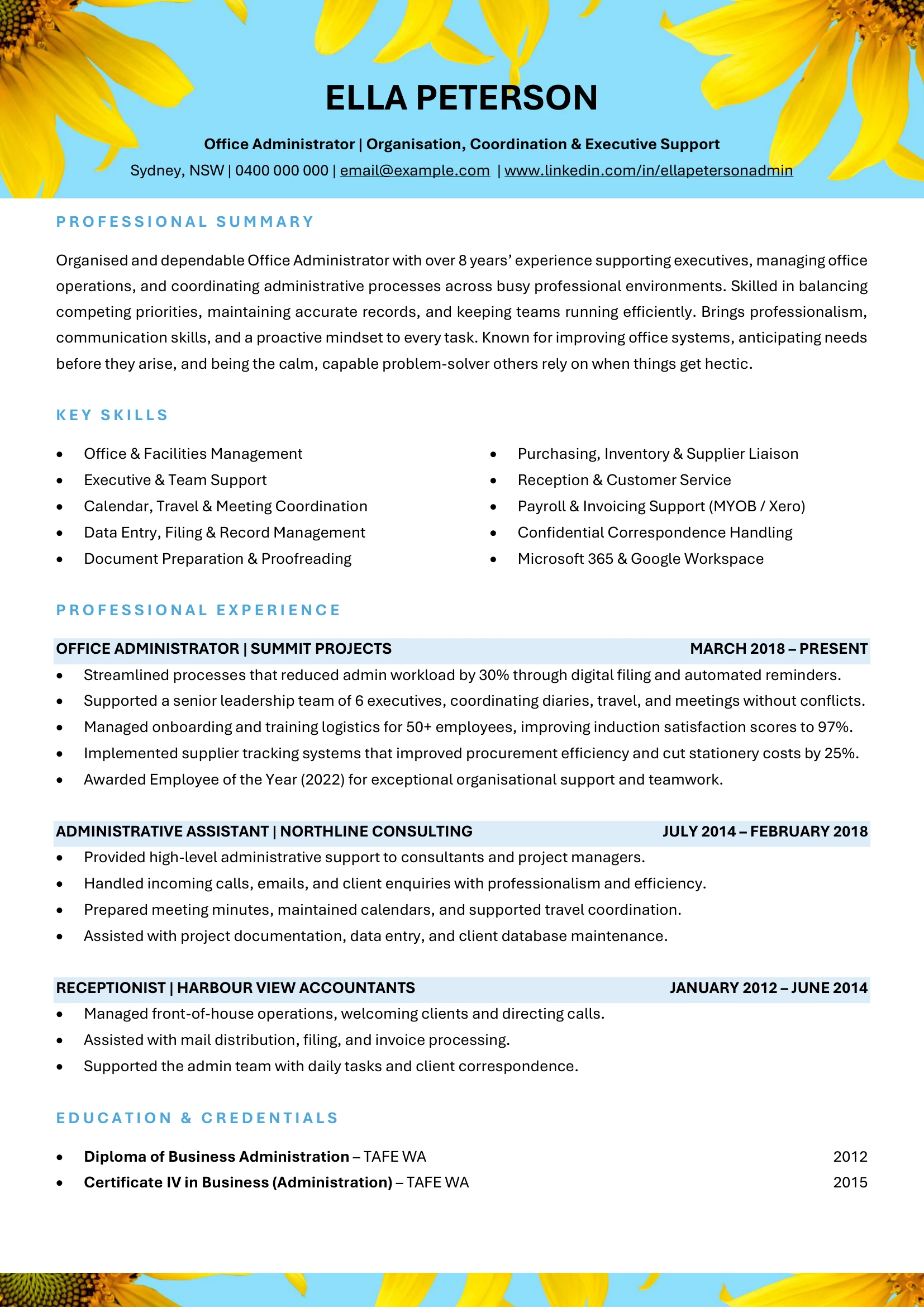
Streamlined digital filing and automated reminders, reducing administrative workload by 30% and improving document retrieval efficiency.
That’s impact — not just activity.
4. Customer & Stakeholder Service Prompts
Reception and administrative roles often shape the first impression of a business. This template guides you to include:
- Client satisfaction metrics
- Positive feedback
- Onboarding coordination
- Event logistics success
It transforms “front desk support” into strategic service contribution.
Professional Yet ATS-Friendly
Many administrative roles require online applications. Applicant Tracking Systems scan resumes for structure and keywords.
This template:
- Avoids complex tables that break in ATS
- Maintains clean formatting
- Uses clear section headings
- Ensures readability both digitally and in print
It’s polished — without being over-designed.
How to Use This Template for Maximum Impact
Start With a Strong Professional Summary
Your summary should capture reliability and organisational strength:
Organised and dependable Office Administrator with 8+ years’ experience supporting executive teams, managing operations, and improving internal systems. Known for proactive problem-solving, confidentiality, and delivering exceptional service in fast-paced environments.
Quantify Where Possible
Numbers build credibility. Examples include:
- Supported 6 senior executives
- Improved onboarding satisfaction to 97%
- Reduced stationery costs by 25%
- Managed logistics for 50+ employees
Show Initiative
Employers value proactive administrators. Highlight improvements you introduced:
- Implemented supplier tracking systems
- Digitised manual records
- Enhanced privacy compliance procedures
- Improved diary coordination efficiency
Who Should Use This Office Administrator Resume Template?
- Office Administrators
- Administrative Assistants
- Receptionists
- Executive Assistants transitioning into operations roles
- Operations Coordinators
- Business Support Officers
Whether you work in corporate offices, construction, healthcare, education, or professional services, the structure is versatile.
What You Receive for $2
- Instant downloadable DOCX template
- Editable in Word or Google Docs
- ATS-friendly formatting
- Guided achievement bullet prompts
- Structured layout for systems and operations
- Compliance and service-focused cues
For just $2, it’s a small investment that can significantly improve your job application results.
Frequently Asked Questions
1. Is this suitable for executive support roles?
Yes. It includes space to highlight diary coordination, travel planning, confidential correspondence, and leadership support.
2. Can I customise it for different industries?
Absolutely. You can tailor the operations snapshot and key achievements to reflect healthcare, corporate, education, or other sectors.
3. Is it editable?
Yes. The template is fully editable in Microsoft Word or Google Docs.
4. Does it include prompts for compliance?
Yes. It includes cues for WHS, onboarding, privacy, and policy adherence.
5. Will it work for entry-level applicants?
Yes. Even early-career professionals can use the structure to highlight reliability, organisation, and customer service strengths.
6. Does ATS-friendly mean plain?
No. It means structured and professional — designed to perform well in digital systems while maintaining a polished appearance.
Ready to Present Yourself as the Organised Professional Every Workplace Needs?
Your role keeps businesses running smoothly. Your resume should reflect that value.
Buy the Office Administrator Resume Template for $2 and download instantly
A strong resume structure helps employers see your reliability, efficiency, and service mindset at a glance.


